
NIOS Solved TMA October 2027 – How to Make & Upload TMA
NIOS Solved TMA October 2027 – How to Make & Upload TMA? Class 10 & 12 Complete Guide
Are you preparing for the NIOS October–November 2027 Public Examination? Do you want to know how to prepare your NIOS Solved TMA for Class 10 and Class 12, write the answers correctly and submit your assignments online?
If yes, this complete guide from PKKapri.com will help you understand the entire process.
Tutor Marked Assignment (TMA) is an important part of the NIOS assessment system for eligible learners. Students should prepare their subject-wise assignments carefully and submit them through the official NIOS Student Portal within the prescribed schedule.
In this article, you will learn:
- What is NIOS TMA and why is it important?
- Who needs to submit TMA for October 2027?
- Where to download October 2027 TMA Questions?
- How to prepare a handwritten solved assignment?
- How to write the TMA Front Page?
- How many pages should an assignment contain?
- How to scan handwritten TMA into PDF?
- How to upload and submit TMA online?
- How to check TMA submission status and marks?
- Where to get NIOS Solved TMA study material?
Let’s understand everything step by step.
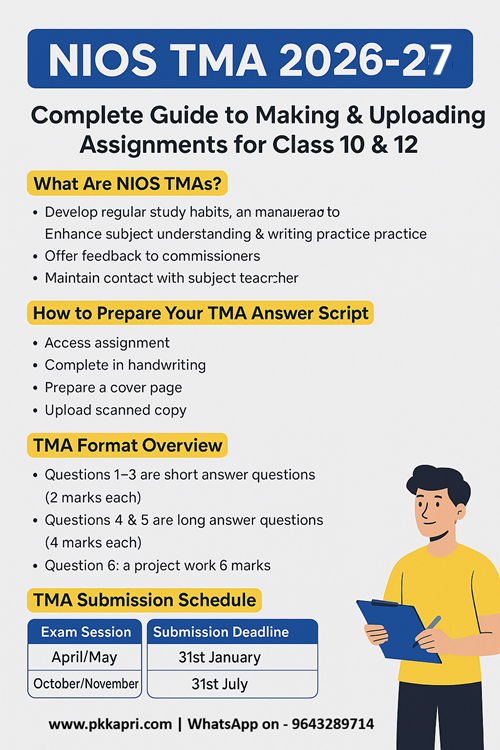
1. What is NIOS TMA?
NIOS stands for the National Institute of Open Schooling. It offers Secondary (Class 10) and Senior Secondary (Class 12) education through the open schooling system.
TMA stands for Tutor Marked Assignment. It is a subject-wise assignment designed to assess a learner’s understanding of the subject and support self-learning.
For applicable subjects, TMA carries 20% weightage of the theory component, while the external theory examination carries 80% weightage.
This means that TMA can contribute to your final subject performance. Therefore, eligible students should not ignore their assignments.
Who needs to submit TMA?
As per the NIOS Academic Prospectus 2026-27, TMA is applicable to eligible learners admitted through Stream 1. It is not applicable to Stream 2, Stream 3 and Stream 4 learners under the stated rules.
Always check your admission stream, registered subjects and current NIOS instructions before preparing or submitting your assignment.
2. NIOS TMA October 2027 – Important Dates
Students appearing in the October-November 2027 examination should keep an eye on the official NIOS notifications.
The NIOS Academic Prospectus 2026-27 provides the following schedule for October-November examinations:
| Particulars | Schedule / Information |
|---|---|
| Examination Session | October-November 2027 |
| Courses | Secondary & Senior Secondary |
| Classes | Class 10 & Class 12 |
| Assignment | Tutor Marked Assignment |
| Submission Mode | Online |
| Previous Prospectus Schedule | 31 July |
| Teacher Feedback Schedule | 15 August |
| Official Submission Portal | sdmis.nios.ac.in |
Important: The dates above are based on the schedule published in the 2026-27 Prospectus. They should not be treated as the confirmed October 2027 deadline. Follow the latest NIOS notification and the date displayed on your Student Dashboard.
Official updates: https://sdmis.nios.ac.in/registration/home-notifications
3. Where to Download NIOS TMA Questions for October 2027?
Before preparing your assignment, download the correct TMA Question Paper for each registered subject.
Follow these steps:
- Visit the official NIOS Student Portal: https://sdmis.nios.ac.in/
- Login using your student account.
- Open your Student Dashboard.
- Find the TMA Download or Assignment section.
- Check your registered subjects.
- Download the relevant subject-wise TMA Question Paper.
- Read all instructions carefully before writing the answers.
Remember:
- Download the correct academic session’s question paper.
- Check the subject name and subject code.
- Do not use an old session’s assignment without checking the current questions.
- Follow the instructions given in the actual question paper.
- Prepare a separate assignment for each applicable subject.
4. How to Make NIOS Solved TMA for Class 10 & 12?
Once you have downloaded the question paper, the next step is to prepare your handwritten assignment.
Step 1: Arrange the Required Materials
Before starting, arrange the following items:
- A4-size ruled sheets
- Blue or black ball pen
- Pencil, eraser and scale
- NIOS TMA Question Paper
- Assignment Front Page
- Stapler or file
- Mobile phone or scanner app
Use clean sheets and maintain a consistent writing style throughout the assignment.
Step 2: Prepare the TMA Front Page
Every subject’s assignment should have a proper front page containing the required student and subject details.
You can use the following format:
NIOS TUTOR MARKED ASSIGNMENT
- Student Name: __________________
- Enrollment Number: __________________
- Course: Secondary / Senior Secondary
- Class: 10th / 12th
- Subject Name: __________________
- Subject Code: __________________
- Academic Session: 2026-27 / Applicable Session
- Examination: October-November 2027
Fill in your actual details carefully. Do not enter an incorrect Enrollment Number or Subject Code.
Step 3: Write Answers in Your Own Handwriting
Prepare the answers according to the questions and instructions provided by NIOS.
For better presentation:
- Write clearly and neatly.
- Use proper headings and subheadings.
- Maintain suitable margins.
- Underline important terms where appropriate.
- Use diagrams and examples wherever required.
- Keep answers relevant to the questions.
- Avoid unnecessary repetition.
A well-organised assignment is easier to read and evaluate.
Step 4: Follow the Correct Question Numbering
Write the question number before every answer.
For example:
Question 1: Write your answer here.
Question 2: Write your second answer here.
Maintain the same sequence as the question paper unless the instructions specify otherwise.
Step 5: Complete All Required Questions
Read the question paper carefully and answer all questions required by the instructions.
If internal choices are provided, follow the specified choice pattern. Do not leave required questions unanswered.
Step 6: Add Page Numbers
Write page numbers on all assignment sheets.
This will help you maintain the correct order while arranging and scanning the pages.
Step 7: Arrange the Assignment Properly
After completing the answers, arrange the pages in the correct sequence.
Suggested order:
- Front Page
- Question 1 Answer
- Question 2 Answer
- Question 3 Answer
- Remaining Answers
Check the entire assignment before scanning.
5. How Many Pages Should NIOS TMA Have?
There is no single page count that should be assumed for every NIOS subject.
The number of pages depends on:
- Number of questions
- Marks assigned to each question
- Length and nature of the answers
- Subject requirements
- Instructions in the question paper
Write short answers for short questions and explain long answers in sufficient detail.
Do not add unnecessary content just to increase the number of pages. Focus on accuracy, completeness and presentation.
6. How to Make PDF of Handwritten NIOS TMA?
After completing your assignment, scan all pages and convert them into a PDF file.
You can use a mobile scanner application or a scanner device.
Mobile PDF Scanning Steps
- Open a reliable document-scanning app.
- Place the assignment sheet on a flat surface.
- Capture each page clearly.
- Adjust the page boundaries.
- Check that the complete page is visible.
- Arrange all pages in the correct sequence.
- Save the scanned document as a PDF.
- Open the PDF and review every page.
Important PDF Checklist
Before uploading, make sure:
- All pages are readable.
- No page is missing.
- Pages are not upside down.
- The writing is not blurred.
- The page sequence is correct.
- The PDF opens properly.
- The file meets the size and format requirements shown on the NIOS Portal.
Create a separate PDF for each subject.
Example file names:
- NIOS_TMA_English_Class10.pdf
- NIOS_TMA_Hindi_Class10.pdf
- NIOS_TMA_Mathematics_Class10.pdf
- NIOS_TMA_Physics_Class12.pdf
- NIOS_TMA_Accountancy_Class12.pdf
7. How to Upload NIOS TMA Online for October 2027?
Once your handwritten assignment is ready and converted into PDF, you need to submit it through the official NIOS Student Portal.
Follow these steps:
Step 1: Open the NIOS Student Portal
Visit:
Step 2: Login to Your Student Account
Use the appropriate student login option and enter your required login details.
Step 3: Open the TMA Section
After login, visit your Student Dashboard.
Look for the TMA Download/Upload or relevant assignment option available for your account.
Step 4: Select Your Registered Subject
Choose the subject for which you have prepared the assignment.
Check the subject name and code carefully.
Step 5: Select Your PDF File
Choose the correct subject-wise PDF from your mobile or computer.
Make sure you do not select another subject’s assignment by mistake.
Step 6: Upload the Assignment
Upload the selected PDF according to the instructions displayed on the portal.
Wait until the upload process is completed.
Step 7: Check the Details
Before final submission, verify:
- Student details
- Subject name
- Subject code
- Uploaded PDF
- Page sequence
- File readability
Step 8: Complete Final Submission
Follow the on-screen instructions and complete the final submission or confirmation process.
If the portal displays an acknowledgement or confirmation, save it for future reference.
Step 9: Check TMA Status
Return to your Student Dashboard and open the available TMA Status section.
Check whether the submission is reflected against the relevant subject.
Important: Selecting a file or starting an upload does not necessarily mean your assignment has been successfully submitted. Always check the final status shown on the portal.
8. Can You Re-upload NIOS TMA if You Upload the Wrong File?
Mistakes can happen. A student may accidentally upload:
- The wrong subject’s assignment
- An incomplete PDF
- A blurred or unreadable document
- An incorrect assignment file
The NIOS Academic Prospectus 2026–27 states that if a learner uploads an incorrect TMA, the correct TMA can be re-uploaded within seven days from the date of uploading the incorrect TMA.
Check the current portal instructions and applicable NIOS rules before attempting a correction. Do not assume that an already submitted assignment can always be replaced at any time.
The best approach is to check the PDF carefully before final submission.
9. How to Check NIOS TMA Status and Marks?
After uploading your assignment, you should regularly check your Student Dashboard.
Follow these steps:
- Open https://sdmis.nios.ac.in/
- Login to your student account.
- Visit the TMA Status or relevant dashboard section.
- Check the status for each subject.
- Check the marks when they are made available.
Remember that submission status and evaluated marks are different. Marks may take time to appear after submission.
If you face a problem, contact your Study Centre or the concerned NIOS Regional Centre.
10. Common Mistakes to Avoid While Preparing NIOS TMA
| Common Mistake | What You Should Do |
|---|---|
| Using an old question paper | Download the applicable session’s paper |
| Wrong subject code | Verify your registered subject |
| Missing answers | Complete all required questions |
| Poor handwriting | Write clearly and neatly |
| Incorrect front page | Check student details |
| Missing page numbers | Number every page |
| Wrong page sequence | Arrange pages before scanning |
| Blurred PDF | Scan in good quality |
| Wrong subject PDF | Check the file before upload |
| Missing final submission | Verify the final status |
11. Get NIOS Solved TMA October 2027 Study Material from PKKapri.com
Preparing every subject’s assignment can take time, especially when you have multiple subjects in Class 10 or Class 12.
If you need help understanding the questions and preparing your answers, PKKapri.com provides NIOS academic support and study resources.
Explore the available study materials:
- NIOS Class 10 Solved TMA
- NIOS Class 12 Solved TMA
- Subject-wise Handwritten Assignment PDF
- NIOS Guide Books and Study Material
- Previous Year Solved Question Papers
- Sample Papers and Model Test Papers
- Guess Papers and Exam Preparation Resources
Why Use Solved TMA Reference Material?
Solved assignments can help students:
- Understand how to approach assignment questions.
- Learn answer presentation and structure.
- Refer to subject-wise solutions.
- Prepare their own handwritten answers.
- Save time during exam preparation.
Looking for NIOS Solved TMA October 2027?
Visit PKKapri.com to check the availability of subject-wise solved assignment material.
Website: https://www.pkkapri.com/
WhatsApp: 9643289714
Note: Solved TMA material is provided as academic reference and preparation support. Students should understand the answers, prepare their own work and follow the current NIOS submission instructions.
12. Frequently Asked Questions – NIOS Solved TMA October 2027
Q1. What is NIOS TMA?
TMA stands for Tutor Marked Assignment. It is a subject-wise internal assessment component for eligible NIOS learners.
Q2. Is NIOS TMA compulsory for October 2027?
TMA is applicable to eligible learners as per NIOS rules. According to the 2026–27 Prospectus, it applies to eligible Stream 1 learners. Check your admission stream and dashboard.
Q3. What is the last date for NIOS TMA October 2027?
The separate official October–November 2027 TMA deadline has not been identified as of 29 November 2026. The 2026–27 Prospectus gives 31 July as the learner submission date for the October–November examination schedule. Check the latest notification for the confirmed 2027 date.
Q4. How much weightage does NIOS TMA carry?
For applicable subjects, TMA carries 20% weightage of the theory component. The external theory examination carries 80%.
Q5. Can I submit NIOS TMA offline?
NIOS requires applicable TMAs to be uploaded online through the Student Portal. Follow the latest official instructions.
Q6. Can I prepare NIOS TMA on A4 sheets?
A4-size ruled sheets are commonly used for handwritten assignments. Follow the instructions provided with your subject’s TMA question paper.
Q7. Can I upload TMA through my mobile phone?
Yes, you can use a mobile browser if the NIOS Student Portal supports the process on your device and your PDF meets the portal’s requirements.
Q8. Should I make a separate PDF for every subject?
Yes. Prepare and upload subject-wise PDFs according to the options and instructions shown on your Student Dashboard.
Q9. Can I correct an incorrect TMA after uploading?
The 2026–27 Prospectus provides a seven-day window to re-upload the correct TMA after uploading an incorrect one. Check the current portal instructions before making a correction.
Q10. Where can I get NIOS Solved TMA October 2027?
You can visit https://www.pkkapri.com/ to check available subject-wise NIOS Solved TMA and other study materials.
Conclusion
Preparing and submitting NIOS TMA for the October–November 2027 examination is an important task for eligible students.
Start by downloading the correct subject-wise question papers. Prepare neat handwritten assignments, write all required answers, add a proper front page, scan the pages into PDFs and upload them through the official NIOS Student Portal.
Do not wait until the last date. Keep checking the official NIOS notifications for the confirmed October 2027 TMA submission schedule.
For NIOS Class 10 and Class 12 Solved TMA, Handwritten Assignment PDFs, Guide Books and Exam Preparation Material, visit:
WhatsApp: 9643289714
Official NIOS Links
- NIOS Official Website: https://nios.ac.in/
- NIOS Student Portal: https://sdmis.nios.ac.in/
- NIOS Notifications: https://sdmis.nios.ac.in/registration/home-notifications
- NIOS Academic Prospectus: https://cdn.nios.ac.in/cms/documents/2026/Oct/18/1792322980_Academic_Prospectus_2026-27.pdf
Disclaimer: PKKapri.com is an independent educational support website and is not the official website of NIOS. Dates, eligibility, submission rules and portal procedures may change. Always verify the latest information through official NIOS notifications and your Student Dashboard.


